
Core Messaging Features
These features are table-stakes. Launch without them and users will leave.
Text Messaging
One-to-one text chat between matched users.
Requirements:
- Send and receive text messages
- Message appears on both users' screens within 2-3 seconds
- Push notification when message arrives
- Messages persist (stored for at least 30 days, ideally indefinitely)
- Block/unmatch functionality (users can block or unmatch, stopping conversation)
- Delete from view (users can delete message from their screen, but it stays on recipient's screen)
Message history:
- Show last 100 messages by default
- Load more when user scrolls up
- Load new messages when user scrolls down
Typical engagement:
- 30% of matched users send at least one message
- Average conversation: 4-8 messages before one person stops responding
- Users who exchange 5+ messages are 70% likely to exchange phone numbers and meet
Match Notification
When two users like each other, notify both:
- Push notification: "You matched with [Name]!"
- In-app notification badge
- Show match in match list
- Allow immediate messaging
Timing matters. Send notification within 1-2 seconds of second person swiping. Users expect immediate feedback.
Chat List
All active conversations in one list.
Display for each conversation:
- Profile photo of matched person
- Name and age
- Last message preview ("Really enjoyed meeting you!")
- Time of last message (2 hours ago, Yesterday, etc.)
- Unread count (shows how many new messages)
- Online status (online, offline, or last seen 2 hours ago)
Sort by:
- Most recent message first (default)
- Alphabetical by name
- Unread messages first
Users with 5+ active conversations appreciate good chat management.
Unread Messages
Users need to know when new messages arrive.
Indicators:
- Badge on chat icon (red circle with count: "3")
- Red dot next to conversation in chat list
- Bold name for conversations with unread messages
Users should be able to see at a glance which conversations need attention.
Text-Based Messaging
Text is the foundation. Master it before adding complexity.
Message Content
Allow text characters only (no links, no file uploads initially). Plain text is simple and safe.
Character limit: 5,000 characters per message (enough for normal conversation, prevents wall-of-text spam).
Allow:
- Emoji (dating is playful, emoji adds personality)
- Line breaks
- Common Unicode characters
Don't allow:
- HTML tags (prevents XSS attacks)
- File uploads (except dedicated features like photos)
- Phone numbers (prevent contact info leakage to non-matched users)
Read Receipts
Show when recipient has read your message.
Three states:
- Sent (message sent to server, icon: checkmark)
- Delivered (message reached recipient, icon: double checkmark)
- Read (recipient opened message, icon: blue double checkmark)
Pros:
- Users feel acknowledged
- Know whether message was seen or ignored
- Adds feeling of real-time conversation
Cons:
- Can create anxiety (user waits for read receipt, shows off-putting if person leaves on "delivered" for hours)
- Privacy concern (some users don't want to reveal when they read messages)
Recommendation: Include as optional feature (users can turn off "show read receipts" in settings).
Typing Indicators
Show "User is typing..." when someone starts typing.
Implemented as: User starts typing, send "typing" event to server, recipient sees "User is typing...", event expires after 3 seconds of inactivity.
Pros:
- Adds real-time feel
- User knows whether recipient is responding
- Creates sense of engagement
Cons:
- Creates anxiety (waiting for person to finish typing)
- Can feel intrusive (some users feel watched)
Recommendation: Include but allow users to disable.
Link Previews
If user pastes a link in chat, show preview:
- Link title
- Description
- Thumbnail image
- Domain
User sees what link leads to before clicking. Reduces click-jacking and phishing.
Implementation: Use link preview API (Linkpreview.net, Microlink). Cache previews (don't fetch every time).
Message Search
Allow users to search message history.
Search for:
- By keyword (search for messages containing "hiking")
- By person (show all messages with specific match)
- By date (show messages from specific date)
Users with 6+ months of message history will appreciate search.
Advanced Messaging Features
Add these after text messaging is polished.
Voice Messages
Record and send audio message (like WhatsApp voice messages).
Record button, user holds to record, releases to send.
Audio constraints:
- Maximum length: 2-5 minutes
- Auto-transcribe to text (for accessibility and search)
- Compress audio (saves storage)
Pros:
- More personal than text
- Faster to create than typing (if you talk fast)
- Humanizes conversation
- Good for users with accessibility needs
Cons:
- Privacy concern (voice reveals accent, emotional state)
- Requires quiet environment to record
- Battery intensive
- Not appropriate in all contexts (busy places)
Usage rate: 15-25% of users try voice messages. 5-8% use them regularly.
Video Messages
Record and send short video (10-30 seconds).
Similar to voice messages, but with video. User sees brief video of sender.
Pros:
- Most personal communication (besides in-person)
- Reduces catfishing (harder to fake video)
- Increases trust and engagement
Cons:
- Much higher bandwidth (video is 20x larger than audio)
- Privacy concern (people hesitant to record video)
- Requires good lighting/setup
- Drains battery
Usage rate: 3-5% of users create video messages. Mostly niche feature.
Video Calling
Real-time video call between matched users.
Technical implementation: WebRTC peer-to-peer connection with fallback to server relay if direct connection fails.
Pros:
- Highest trust level (face-to-face conversation)
- Reduces no-shows (people committed to showing up after video call)
- Increases first date conversion
Cons:
- High bandwidth requirement
- Privacy concern (video call recording)
- Technical complexity (connection failures, lag)
- Requires stable internet
- Cost ($0.01-0.05 per minute with provider like Twilio)
Usage rate: 5-10% of matched users attempt video call. Success rate depends on internet quality.
Technical consideration: Video infrastructure is expensive. Only implement if your unit economics support it ($0.05 x 1000 calls = $50, do you earn more than $50 from those users?).
Voice Calling
Real-time voice call (phone call through app).
Similar to video calling, but audio only. Lower bandwidth, fewer privacy concerns, but less intimate.
Usage rate: 10-15% of users attempt voice call. Higher adoption than video calling.
Photo Sharing in Chat
Allow users to send photos in messages.
Typical: Share existing photos from profile, or take new photo and send.
Considerations:
- Compress photos automatically (saves bandwidth)
- Limit to 10-20 photos per message
- Scan for explicit content (automatic content detection)
- Allow download or view-only
Users share an average of 2-5 additional photos after first message.
Message Reactions / Emoji Reactions
Let users react to messages with emoji (heart, laugh, surprise, etc.).
Pros:
- Playful way to respond without typing
- Increases engagement (more interactions per conversation)
- Lightens tone
Cons:
- Can be misinterpreted
- Might discourage substantive conversation
Usage rate: 30-40% of users use emoji reactions occasionally.
Message Forwarding / Sharing
Allow users to forward messages to other matches or share outside platform.
Risks:
- Messages forwarded without sender knowing (privacy)
- Screenshots and forwarding are uncontrollable anyway
- Ability to share increases engagement
Recommendation: Allow but warn users their message might be shared.
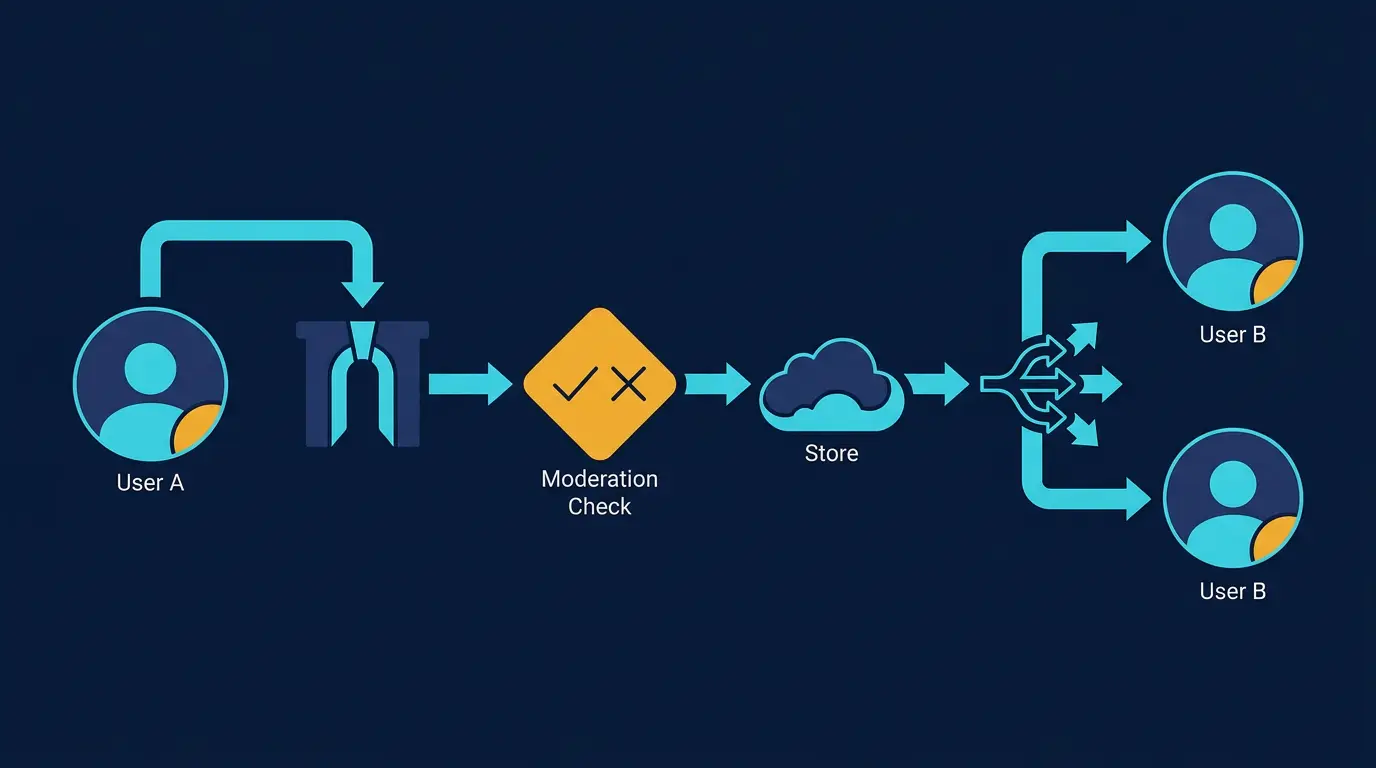
Monetization Through Messaging
Messaging is where most dating platforms make money.
Message Limits for Free Users
Free users can send limited messages:
- Option 1: 5 messages per day to new matches (upgrade for unlimited)
- Option 2: Only first message is free, subsequent messages require premium
- Option 3: Unlimited messages but delayed delivery (premium users send instantly, free users see 30-minute delay)
Impact: Converts 5-15% of free users to premium based on messaging friction.
Tradeoff: More friction = higher conversion, but lower engagement. Users frustrated by limits may leave platform.
Recommendation: One free message with match, then upgrade wall for subsequent messages. This is least friction while still driving conversions.
Super Messages / Boost Messages
Let users send special message that stands out:
- Different color
- Animated effect
- Appears at top of chat
Cost: $0.99-$2.99 per super message
Usage: 3-8% of users buy super messages. Average spend per buyer: $5-$15 per month.
Icebreaker Suggestions
Pre-written conversation starters that users can send.
Examples:
- "What's your favorite travel destination?"
- "If you could have dinner with anyone, who would it be?"
- "What's the best concert you've ever been to?"
Users tap suggestion, message sends immediately.
Impact: First message response rate increases from 28% to 42% (50% improvement).
Users appreciate pre-written messages (removes pressure of creating original opener).
Disappearing Messages
Messages that disappear after 24 hours (like Snapchat).
Pros:
- Reduces anxiety about digital trail
- Some users feel safer with messages disappearing
- Creates urgency (if it disappears, better read it now)
Cons:
- Users want to save important messages
- Complicates moderation (can't review reported messages after they disappear)
Not common in dating apps. Snapchat culture is different from dating culture.
Premium Messaging Features
Premium users get:
- Unlimited messages (vs. limited for free)
- Message reactions
- Photo sharing in chat
- Voice messages
- Video messages (sometimes)
These drive $3-$10/month premium subscriptions for heavy messagers.
Engagement and Behavioral Features
Beyond raw messaging, behavioral features drive engagement.
Last Seen Status
Show when user was last active ("Last active: 2 hours ago").
Pros:
- Reduce anxiety (user sees person isn't ignoring them, just not online)
- Encourage active users to message
Cons:
- Privacy concern (people don't want to reveal when they're active)
- Can enable stalking
Recommendation: Show broad time windows ("Today", "Yesterday", "This week") not exact time.
Online Status
Show when user is currently active ("Online now").
Pros:
- User knows when person is available for conversation
- Encourages real-time messaging
Cons:
- Privacy (reveals activity patterns)
- Enables stalking
Recommendation: Consider disabling or making optional.
Message Notifications
Push notification when new message arrives.
Timing:
- Immediate: Send within 3 seconds
- Batch: Wait 15 minutes, then send digest
Frequency: Send 1-3 notifications per day maximum. Too many = user mutes app.
Customization:
- Allow users to turn off notifications per conversation
- Allow users to set quiet hours (no notifications 10 PM - 8 AM)
Auto-Reply
Let users set automatic response to incoming messages ("Currently traveling, will message back soon!").
Pros:
- Manages expectations (person knows you'll respond later)
- Reduces silence anxiety
Cons:
- Reduces urgency to respond immediately
- Can feel automated/cold
Message Status View
Show detailed message metadata:
- When message was sent
- When message was delivered
- When message was read
- How long user spent reading it
Pros:
- Deep engagement signal
- Users see they're being read
- Moderation (timestamps help investigate disputes)
Cons:
- Privacy concern
- Creates anxiety
Messaging Performance and Infrastructure
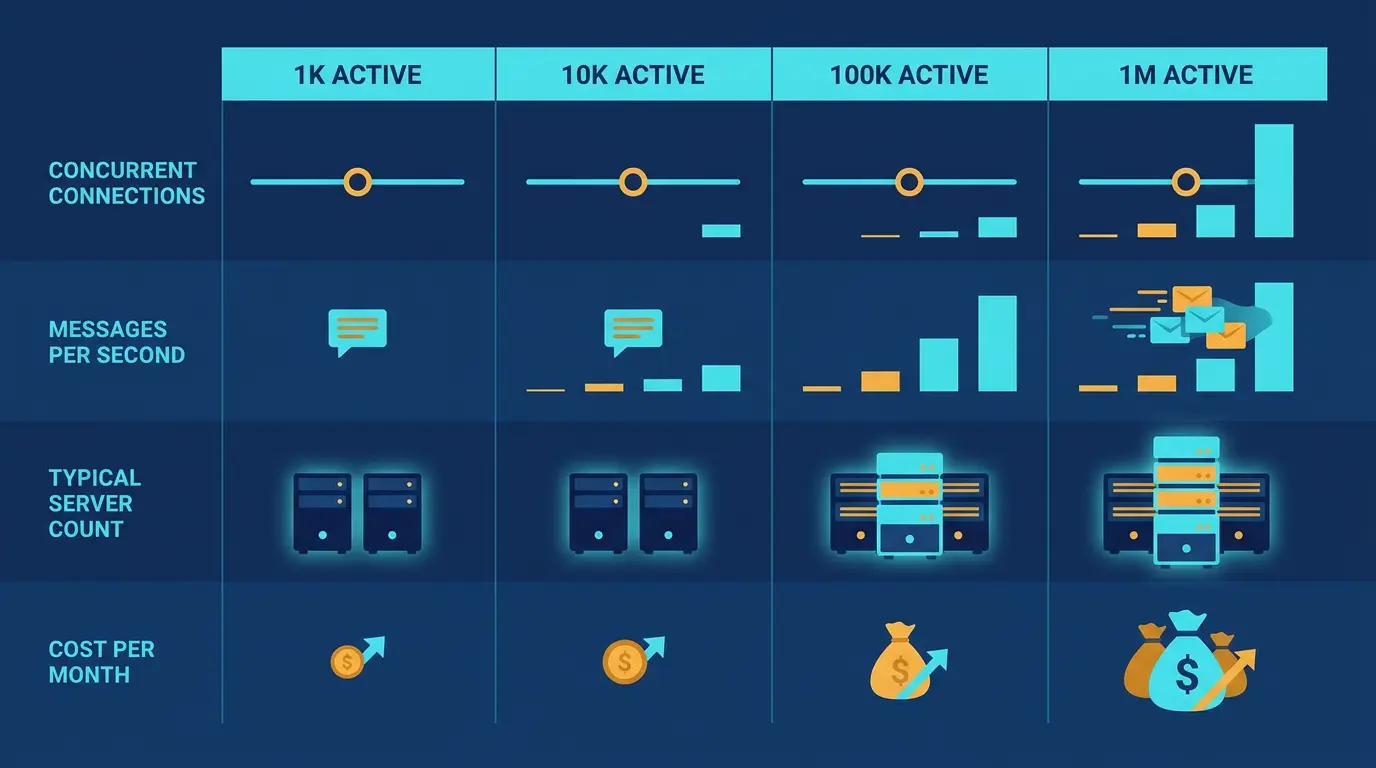
Messaging must be fast and reliable.
!Messaging feature roadmap and engagement impact analysis *Messaging feature roadmap and engagement impact analysis*
Message Delivery Speed
Target: <500ms from send to delivery on recipient's device
Infrastructure needed:
- Message queue (store messages if recipient offline)
- Push notification service
- WebSocket or long-polling for real-time delivery
- Database optimized for reads (messages are read far more than written)
Cost impact: Real-time messaging doubles infrastructure costs compared to simple request-response apps.
Message Storage
How long to store messages?
Options:
- Forever (unlimited cost growth, GDPR compliance complex)
- 1 year (most users don't reference old messages)
- 30 days (minimal storage, users lose history)
Recommendation: Store 6-12 months. Balances user needs (people want history) with cost.
Database optimization:
- Index messages by user ID
- Index messages by timestamp
- Separate active conversations (last 3 months) from archive
Offline Message Handling
User offline when message arrives. Message waits in queue. User comes online, receives queued messages.
Requirements:
- Queue messages for 7 days (after 7 days, consider undeliverable)
- Batch queue into one notification when user comes online
- Show timestamp of when message was sent vs. delivered
Moderation and Safety
Messaging creates safety risks.
Message Content Scanning
Automatic scan for:
- Harassment (threats, insults)
- Explicit content (sexual solicitation)
- Phone numbers / contact info (trying to move off platform)
- URLs (potentially malicious links)
- Payment requests (scams)
Block or flag suspicious messages for human review.
False positive rate: 3-10% (some legitimate messages flagged).
Manual review: Moderator sees flagged message, decides to allow or block.
Message Reporting
Allow users to report inappropriate messages.
Report reasons:
- Harassment or threatening behavior
- Explicit / sexual content
- Attempting to move off platform
- Spam / scam
Reported message reviewed by moderator. If violation found, sender's message deleted and account flagged.
User Blocking
User can block another user, preventing:
- Messaging
- Swiping (don't see each other's profiles)
- Matching with each other again
Users appreciate blocking. 15-20% of users block at least one person during platform lifetime.
Privacy and Data Protection
GDPR requires:
- Users can request download of all messages
- Users can request deletion of all messages
- Messages must be encrypted in transit
Compliance complexity: Moderate (requires message export features and data deletion features).
Messaging Feature Comparison
| Feature | Engagement Lift | Implementation Complexity | Monetization Potential | Launch Priority |
|---|---|---|---|---|
| Text messaging | Baseline | Low | High | 1 (required) |
| Read receipts | +5% | Low | None | 2 |
| Typing indicators | +3% | Low | None | 3 |
| Icebreaker suggestions | +20% | Medium | Medium | 4 |
| Photo sharing | +15% | Medium | None | 5 |
| Voice messages | +8% | Medium | Low | 6 |
| Video calling | +10% | High | Medium | 7 |
| Message reactions | +4% | Low | None | 8 |
| Disappearing messages | +0% | Medium | None | 9 (skip) |
"Engagement lift" is relative impact on matches progressing to multiple messages.
*Caption: Feature implementation priority showing engagement lift percentages, complexity levels, and monetization potential for each messaging capability.*
Key Takeaways
- Text messaging is table-stakes. Launch with it or users leave immediately.
- Read receipts, typing indicators, and icebreaker suggestions should come in month 1-2.
- Icebreaker suggestions increase first message response rate from 25% to 40% (60% improvement). Highly recommended.
- Message limits for free users (5-10 per day) drive premium conversions of 5-15%.
- Voice and video messaging are engagement boosters (8-15% lift) but not required to launch.
- Real-time infrastructure (WebSocket) is essential. Message delays kill engagement.
- Store 12 months of message history. Delete older messages to manage storage costs.
- Allow message blocking and reporting. Users need safety tools.
- Monitor message content for harassment, explicit content, and contact info sharing.
- Photo sharing in chat increases engagement by 15% and is relatively simple to implement.
- Message features are 80% of retention. Users stay because they're having great conversations.
Prioritizing Messaging in Your Platform
When selecting your platform, prioritize messaging capability. Combine messaging with strong matching algorithms to increase conversation quality. And implement essential features that complement messaging, like status updates.
See our guide on Essential Dating Site Features for how messaging integrates with overall platform strategy.
DatingPartners chat handles 1M+ concurrent with moderation live. No DIY WebSocket pain.
Visit DatingPartners.com →