
Why Tracking Fails (and Why It Matters)
Most dating affiliates operate without proper tracking. Here's the cost:
Scenario A: Proper Tracking
- You run $1000 spend across Google Ads, Facebook, and programmatic
- Real conversions: 5 (tracked properly)
- Revenue: $30 (5 conversions x $6 average CPA)
- Your ROI: 3% (barely profitable)
- Decision: You know exactly which channel loses money and pause it
Scenario B: No Tracking
- You run $1000 spend across Google Ads, Facebook, and programmatic
- Affiliate network shows 8 conversions (delayed tracking, data discrepancies)
- Revenue: $48 (8 x $6)
- Your ROI: 4.8% (seems profitable)
- Decision: You scale spend to $2000, thinking it's working
- Reality: 3-4 of those 8 conversions are false positives. True ROI is negative. You've now lost $2000 instead of $1000.
The stakes: Poor tracking turns a small loss into a catastrophic loss.
Most affiliates operate in "Scenario B" for 3-6 months before realizing conversions don't match. By then, they've wasted $5K-15K+ in capital chasing false profits.
The Tracking Stack Explained
Proper tracking requires 4 interconnected layers:
Layer 1: Site Tracking (Google Tag Manager) Records every user action on your website:
- Page views
- Click-throughs to offers
- Form submissions
- Time on site
- Device/browser info
Layer 2: Conversion Tracking (Affiliate Network Pixel) Records which users actually converted on the offer:
- User lands on offer page
- User completes signup/purchase
- Conversion pixel fires, reports back to affiliate network
- Affiliate network credits you with conversion
Layer 3: Offer Tracking (Your Tracker) Records the full funnel from your traffic source to conversion:
- User clicks your ad or lands on your site
- Voluum/RedTrack assigns unique ID to that user
- User converts on offer
- Conversion postback to your tracker confirms
- You now know: This traffic source drove this conversion
Layer 4: Data Consolidation (Dashboard) Aggregates data across all layers:
- Daily spreadsheet or dashboard showing all metrics
- Traffic source performance consolidated
- Revenue by traffic source, landing page, offer
- Profitability calculations
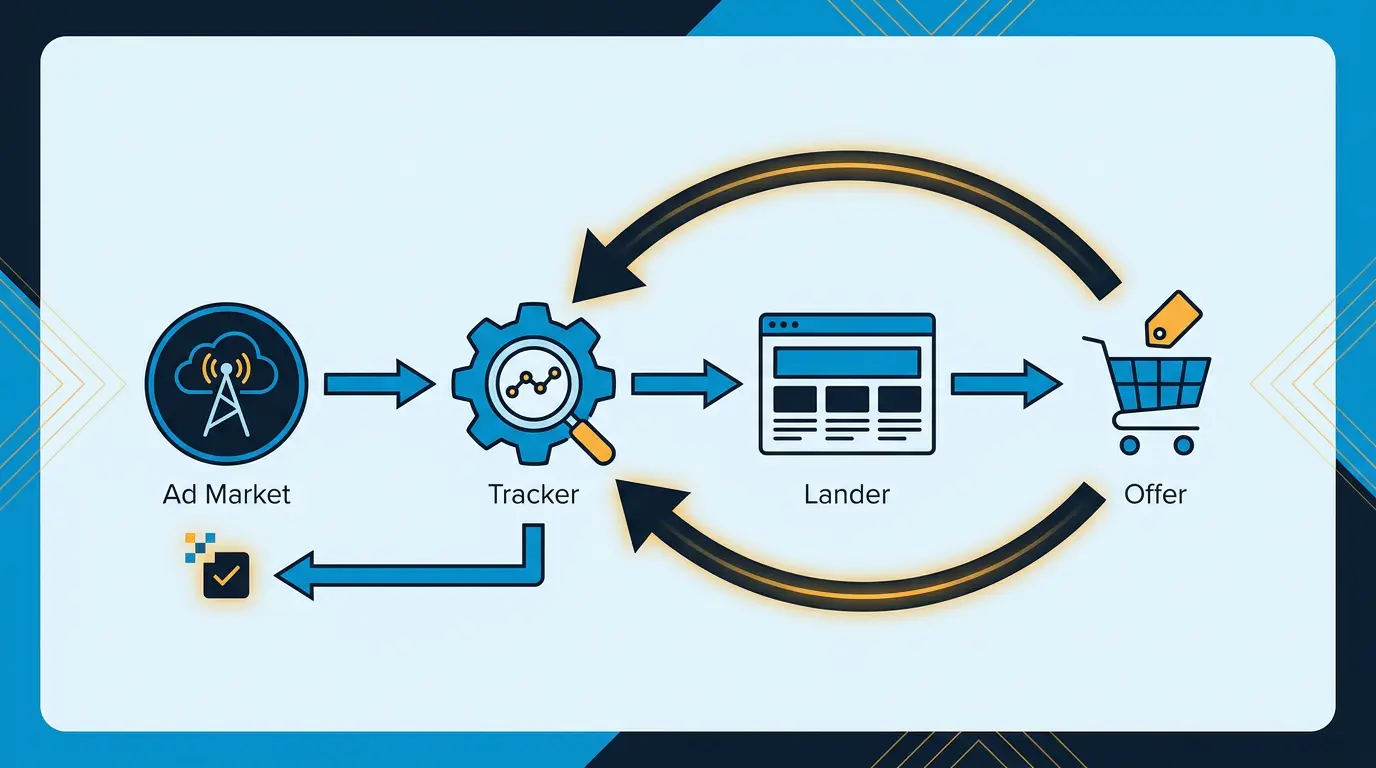
Let me visualize the flow:
``` Traffic Source -> Your Site -> Offer Page -> Conversion (GTM Track) (Pixel Track) (Postback Report)
Your Tracker Logs
Dashboard Shows Data ```
Without all four layers, you're missing data.
Setting Up Conversion Pixels
The conversion pixel is the foundation of attribution.
What is a Conversion Pixel?
A small piece of code that fires when a user completes the desired action (e.g., signing up for eHarmony). It reports that conversion back to the affiliate network, crediting you.
Where it lives:
On the offer's "confirmation page" - the page users see after successful signup. This page has a unique URL like "eharmony.com/thankyou" or "eharmony.com/welcome".
Your affiliate network provides this pixel. It looks like:
```html <img src="https://affiliate.eharmony.com/conversion?id=YOUR_ID&amount=5.99¤cy=USD" /> ```
How to Install It:
- Get the pixel from your affiliate network (usually in their dashboard under "tracking" or "pixels")
- Install it in three places:
a. On your site's thank-you page (for direct conversions) b. In your tracking software (Voluum, RedTrack) for unified reporting c. In Google Tag Manager for data integration
Critical: Pixel Timing
The pixel must fire on the conversion confirmation page, not before. Common mistake: placing pixel on the landing page. This fires every time someone visits, not just when they convert. Data becomes meaningless.
Testing Your Pixel:
- Sign up for the offer yourself (test account)
- Complete the full signup process
- Reach confirmation page
- Check your affiliate network dashboard - conversion should appear within 5-15 minutes
- If no conversion appears after 20 minutes, the pixel isn't working
Understanding Postback URLs
The postback URL is how your tracker communicates with the affiliate network (or vice versa).
What is it?
A unique URL that says "User X converted on offer Y. Attribution should go to traffic source Z."
Postback Flow:
- User clicks your ad/link with unique tracking ID
- Your tracker logs: "ID ABC landed on offer eHarmony from Google Ads"
- User converts on eHarmony
- eHarmony's system checks: "Did anyone convert from this offer?"
- eHarmony fires a postback to your tracker: "ID ABC converted. Send attribution to their source."
- Your tracker receives postback: "ABC converted. That was Google Ads traffic. Credit Google Ads with $6 revenue."
How to Set Up Postback:
Get your unique postback URL from your tracker (Voluum, RedTrack, BeMob). It looks like:
``` https://voluum.com/postback?pid={offer_id}&payout={amount}&sub1={user_id} ```
Then provide this URL to your affiliate network. The network will fire this URL each time a conversion happens.
Critical Parameters:
| Parameter | Meaning | Required |
|---|---|---|
| pid | Offer ID | Yes |
| payout | How much user made (sometimes dynamic) | Yes |
| sub1 | Your internal tracking ID | Yes (usually) |
| sub2-sub5 | Custom parameters (traffic source, campaign, etc) | No but helpful |
Testing Postback:
- Get your postback URL from tracker
- Provide to affiliate network
- Let them know to test it
- Wait for first real conversion
- Check your tracker dashboard - conversion should appear same day
If conversions don't appear in your tracker within 24 hours of appearing in the network's dashboard, postback isn't configured correctly.
Tracker Selection: Voluum vs. RedTrack vs. BeMob
Most dating affiliates use one of three trackers:
Voluum
- Cost: $49-99/month depending on volume
- Strength: Easiest to learn, excellent UI, best for beginners
- Weakness: Slightly slower with very high volume (100K+ clicks/day)
- Setup time: 1-2 hours
- Best for: Beginners to intermediate affiliates
Features:
- Campaign and flow tracking
- Device, geo, and OS segmentation
- Rule-based optimizations (pause/increase bids)
- Postback management
- Reporting and dashboards
RedTrack
- Cost: $49-199/month depending on volume
- Strength: Advanced attribution, multi-touch tracking, fast infrastructure
- Weakness: Steeper learning curve than Voluum
- Setup time: 3-4 hours (more parameters)
- Best for: Intermediate to advanced affiliates at scale
Features:
- Multi-touch attribution
- API integrations with ad networks
- Advanced filtering and drilling
- Faster processing than Voluum
- Custom reporting
BeMob
- Cost: $49-149/month depending on volume
- Strength: Specialized for affiliate marketing, excellent fraud detection
- Weakness: Smaller community, fewer integrations
- Setup time: 2-3 hours
- Best for: Sophisticated affiliates concerned about click fraud
Features:
- Click fraud detection and prevention
- Multi-offer tracking
- Native integration with ad networks
- Real-time dashboards
- Geo and device targeting
Comparison Table:
| Feature | Voluum | RedTrack | BeMob |
|---|---|---|---|
| Learning curve | Easy | Medium | Medium |
| Speed | Good | Excellent | Excellent |
| Multi-touch attribution | Basic | Advanced | Basic |
| Fraud detection | Basic | Medium | Excellent |
| Cost | $ | $$ | $$ |
| Community | Large | Medium | Small |
| Beginner-friendly | Yes | Somewhat | Somewhat |
Recommendation for Dating Affiliates:
Start with Voluum if you're new. It's the easiest, fastest to implement, and sufficient for 99% of affiliate campaigns. Upgrade to RedTrack or BeMob once you're doing $10K+ monthly and need advanced features.
Building Your Attribution Model
Attribution is how you decide which traffic source deserves credit for a conversion.
Last-Click Attribution (Most Common)
User journey:
- Sees Facebook ad for "best dating apps for seniors"
- Clicks, reads your site
- Clicks eHarmony offer
- Converts
Attribution: 100% credit to Facebook
This is the standard. Last click gets full credit.
First-Click Attribution (Less Common)
Same journey: 100% credit to Facebook (first interaction)
Useful if you want to measure which sources drive initial awareness.
Multi-Touch Attribution (Advanced)
Same journey: Facebook gets 40%, organic gets 60% based on model
More complex but more accurate. Rarely used in dating affiliate because it's overkill for the conversion path length.
Practical Attribution for Dating:
Use last-click. Dating conversions usually happen quickly (1-3 days). User sees ad, clicks, signs up same day. Last-touch is accurate enough.
Setup in Voluum/RedTrack:
- Set tracking parameters to capture traffic source
- Configure postback URL to include traffic source identifier
- Dashboard will show which source receives conversion credit
Conversion Rate Analysis
Once tracking is live, analyze conversion rates systematically.
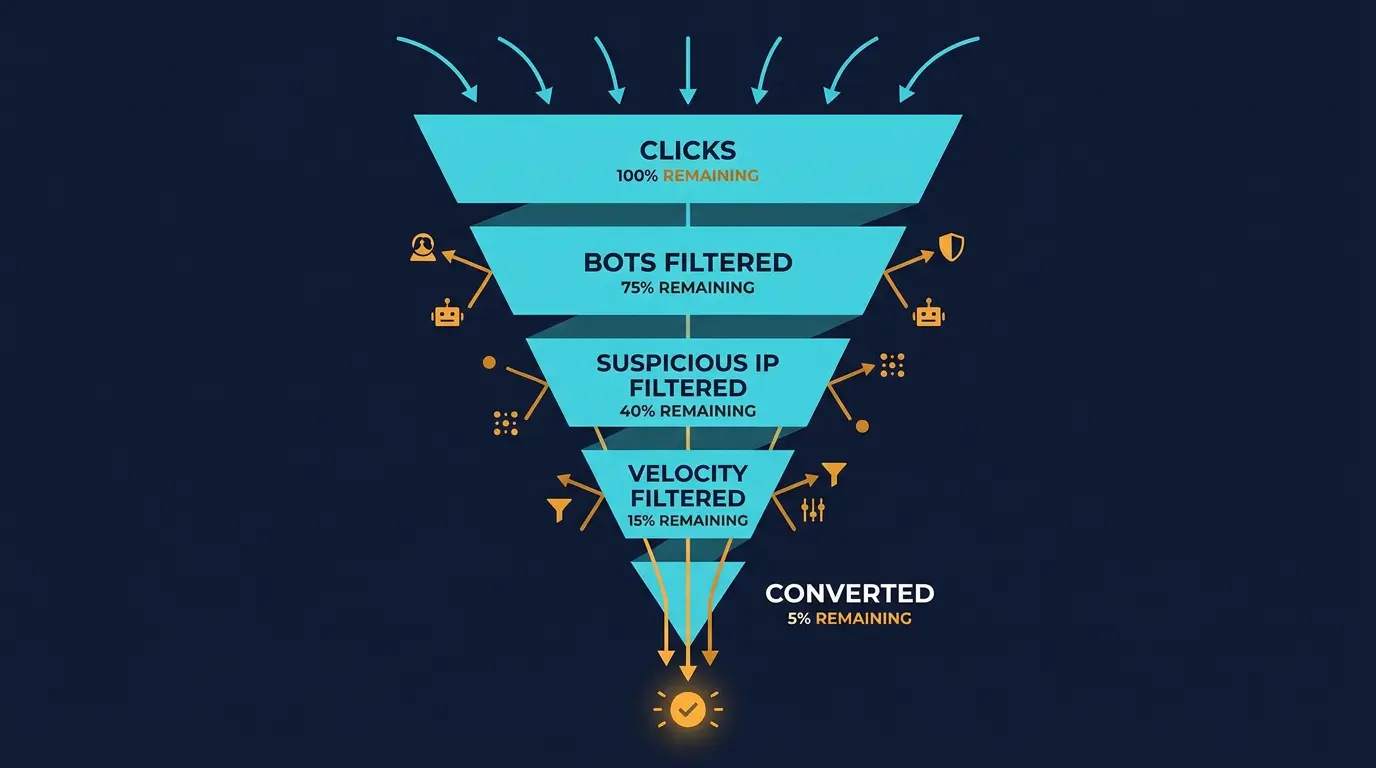
!Affiliate tracking stack and data flow diagram *Complete affiliate tracking stack architecture showing pixel flow, conversion attribution, and fraud detection layers*
Basic Conversion Rate Calculation:
Conversion Rate = Conversions / Clicks x 100
Example: 150 clicks, 3 conversions = 2% conversion rate
Analyzing by Dimension:
Break down conversion rates by:
| Dimension | Why Matters | Action |
|---|---|---|
| Traffic source | Google vs Facebook vs Programmatic | Pause low-converting sources |
| Landing page | Which page converts best | Scale traffic to winners |
| Offer | eHarmony vs Match vs Bumble | Focus on highest-converting offers |
| Geo | US vs UK vs EU | Allocate budget to high-converting geos |
| Device | Mobile vs Desktop | Optimize for dominant device |
| Time of day | Peak conversion times | Adjust bid schedules |
Setting Benchmarks:
| Metric | Benchmark | Action if Below |
|---|---|---|
| Overall conversion rate | 1-2% | Review traffic quality or offer match |
| Organic traffic conversion | 2-3% | If below 1.5%, improve content or UX |
| Cold PPC conversion | 0.5-1% | If below 0.3%, pause campaign |
| Retargeting conversion | 2-4% | If below 1.5%, improve creative or targeting |
| Email conversion | 3-5% | If below 2%, refresh email list or content |
Optimization Triggers:
Set automated alerts:
- If conversion rate drops 30% from baseline, investigate
- If a traffic source drops below 0.3% conversion for 2 consecutive days, pause it
- If an offer drops below 0.8% conversion, test removing it
Revenue Per Traffic Source
Conversion rate matters less than revenue per traffic source.
Calculation:
Revenue Per Source = Total Revenue / Total Clicks
Example:
- Google Ads: $100 revenue / 5000 clicks = $0.02 per click
- Facebook: $60 revenue / 2000 clicks = $0.03 per click
- Programmatic: $20 revenue / 4000 clicks = $0.005 per click
Revenue Per Click Benchmarks:
| Source | Benchmark | Range |
|---|---|---|
| Organic search | $0.03-0.10 | Best - warm traffic |
| Retargeting | $0.02-0.08 | Good - warm audience |
| Google Search | $0.005-0.05 | Depends on keyword quality |
| Facebook/Instagram | $0.002-0.03 | Depends on audience targeting |
| Programmatic | $0.001-0.02 | Low quality but scalable |
Decision Framework:
If revenue per click:
- Above $0.05: Scale this source aggressively
- $0.02-0.05: Optimize and scale conservatively
- $0.01-0.02: Optimize intensively or reduce spend
- Below $0.01: Consider pausing
Optimization Workflows
Once tracking is live, implement daily optimization.
Daily Workflow (15 minutes):
- Check conversion rate changes (look for 20%+ drops)
- Check revenue per source
- Pause any source with negative ROI
- Verify pixel is firing (conversions showing up in network dashboard)
Weekly Workflow (1 hour):
- Segment performance by traffic source, landing page, offer
- Identify top 3 performers
- Identify bottom 3 performers
- Increase budget on top 3 by 20-30%
- Reduce budget on bottom 3 by 50% or pause
- Plan new tests for next week
Monthly Workflow (2-3 hours):
- Full performance review across all dimensions
- Calculate ROI per traffic source
- Calculate CAC (Customer Acquisition Cost) per offer
- Identify trends (improving or declining over time)
- Planning: what worked, what failed, what to test next month
- Update forecasts based on actual performance
Common Tracking Issues and Fixes
Issue 1: Conversions in Affiliate Network But Not in Your Tracker
Cause: Postback URL not configured or incorrect
Fix:
- Verify postback URL with affiliate network
- Check network's documentation for exact URL format
- Test postback in tracker (networks provide test tools)
- Confirm network is firing postbacks (ask support)
- Check if parameters are correct (especially sub1 identifier)
Typical fix time: 2-4 hours
Issue 2: Conversions in Your Tracker But Not in Affiliate Network
Cause: Pixel not installed or firing late
Fix:
- Verify pixel is on confirmation page, not landing page
- Test conversion yourself - does pixel fire within 5 seconds of confirmation?
- Check network dashboard - is there a 24-48 hour delay?
- If delayed, wait longer and check again (networks batch process)
- Contact network support if pixel still not appearing after 48 hours
Typical fix time: 1-3 hours
Issue 3: Conversion Counts Don't Match
Cause: Data discrepancy between your tracker and network
Fix:
- Verify tracking IDs are being passed correctly (check campaign setup in tracker)
- Check if network has attribution window (e.g., 7-day click attribution) - conversions outside window don't count
- Verify conversion values are consistent
- Wait 48 hours for data to settle (networks finalize data on 2-day delay)
- If still off by >10%, contact network support with data comparison
Typical variance: 5-15% discrepancy is normal and acceptable
Issue 4: Some Traffic Sources Show Zero Conversions
Cause: Tracking parameters not set up for that source or source is low quality
Fix:
- Verify tracking parameters are unique to that source
- Check if traffic is reaching your site (check Google Analytics)
- If traffic is there but no conversions recorded, tracking setup is wrong
- If no traffic is there, pause the source - it's not working anyway
Typical fix time: 2-4 hours
Issue 5: Tracking Works on Desktop But Not Mobile
Cause: Mobile-specific tracking issue (common with iOS) or mobile URL tracking
Fix:
- Test conversion on mobile device yourself
- Check if pixel fires on mobile (use browser developer tools)
- Verify tracking parameters work on mobile URLs
- Note: iOS has privacy limitations - tracking may be impossible on older iOS
- Focus on Android or use different mobile strategy
Typical fix time: 3-6 hours
Tracking Across Your Entire Business
Good tracking enables all your other strategies. Once you have proper tracking, master paid ads to scale based on real data. Learn how to optimize geo-targeting with confidence. And use your tracking data to identify seasonal trends so you can adjust spending strategically throughout the year.
Key Takeaways
- Proper tracking requires four layers: site tracking (GTM), conversion pixel, offer tracking (Voluum), and data consolidation
- Install conversion pixel on confirmation page only - wrong placement breaks all data
- Configure postback URL with affiliate network to connect conversions back to their source
- Start with Voluum tracker - it's easiest for beginners and sufficient for most campaigns
- Analyze conversion rate by traffic source, landing page, offer, geo, and device
- Optimize based on revenue per click, not just conversion rate - high volume at low payout can be worse than low volume at high payout
- Implement daily optimization (check for issues), weekly optimization (segment and scale), and monthly planning
- Common issues are fixable - postbacks, pixels, and parameter mismatches account for 90% of problems
- Accept 5-15% data discrepancy between tracker and network - this is normal
- Never scale without tracking - you'll waste capital on unmeasured campaigns
DatingPartners supports every tracker with reliable S2S and rich macros. Plug and go.
Visit DatingPartners.com →